

Proxies
Learn how Fansly API manages proxy infrastructure for secure and reliable Fansly API connections.
Proxy Infrastructure Overview
Fansly Api uses a purpose-built proxy layer to ensure stable connections, account safety, and long-term reliability when interacting with the Fansly platform. Each connected account is isolated behind its own proxy, allowing requests to remain consistent, secure, and compliant with platform behavior.
Proxy management is handled automatically by default, removing the need for manual configuration or third-party services.
Built-in Proxy System (Recommended)
We provide a managed proxy solution designed specifically for Fansly API usage. This option is enabled by default and requires no additional setup.
Key features include:
-
Dedicated IP per account: Each Fansly account is assigned its own exclusive proxy IP.
-
Mobile-grade network: Each connected account gets its own exclusive mobile proxy IP.
-
Country selection: Choose a proxy location during account setup to match your preferred region.
-
Fully managed: Rotation, assignment, and health monitoring are handled automatically.
The built-in proxy system is optimized for Fansly API usage and is recommended for most applications to ensure consistent performance and account safety.
Using a Custom Proxy
If you already operate your own proxy infrastructure, Api Fansly allows you to use your own custom proxy during account connection.
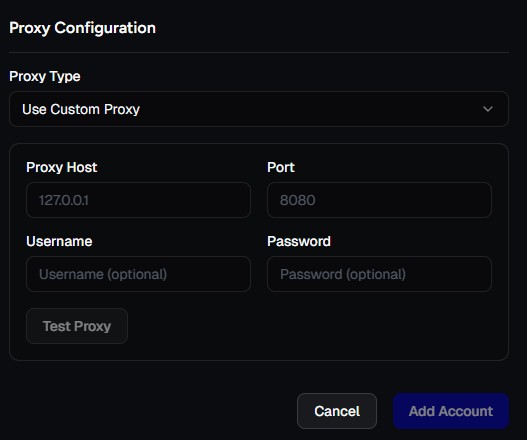
To use a custom proxy:
- Select Use custom proxy when connecting an account
- Provide the required connection details:
- Host
- Port
- Username (if applicable)
- Password (if applicable)
Once configured, click test proxy to check if the proxy is working. If it is, click Add Account to begin the connection process.
Custom Proxy Requirements
To maintain compatibility and reliability, custom proxies must meet the following requirements:
-
Dedicated IP address: Shared or rotating IPs are not supported.
-
Residential or mobile network: Datacenter IP ranges are not supported.
-
Consistent geolocation: The proxy location should align with the account’s historical access region.
-
Protocol support: HTTP and HTTPS protocols must be supported.
Failure to meet these requirements may result in unstable connections or account-related issues.
Best Practices
For optimal results when using proxies with the Fansly API:
- Keep one proxy assigned per account
- Avoid frequent IP or country changes
- Monitor proxy availability and latency
- Contact support if you experience repeated connection failures